How to manage JWT token and consume APIs
JSON Web Token (JWT) flow for External Partner
The client application is assumed to be a confidential client that can store the client application's private key.
Two elements will be used in the JWT Flow
- The X.509 certificate that matches with the client's private key (this private key must be registered in the Client Application Registry and NOT shared with anyone). The format must be of Base64 encoded public X.509 certificate
- The clientId (also called issuer) which identifies the application
The API Gateway uses this certificate to verify the signature of the JWT claim and the issuer encrypted in the JWT bearer token to identify the caller (see how to build a JWT bearer token and how to request the token in the next pages)
Connexion flow :
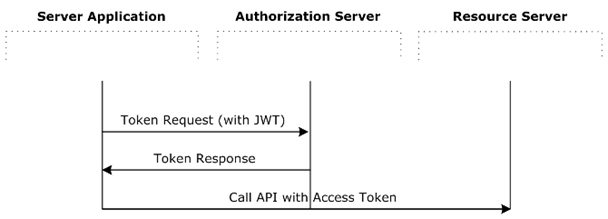
Authorization Server Endpoint depend on the gateway used
Ressouce Server Enpoint depend on the API targeted
How to built a JWT bearer token
|
|


Some Dev tools for generating JWT assertion from dual private & public keys : Apigee partner enrolment journey_039755d6114243878207298a49d17403-281124-1035-2550_0.pdf
How to request an access token
The client token request must be sent in an HTTP POST to the correct token endpoint :
Production : https://api-ce.bnpparibas-pf.com/auth/oauth2/v2/token
Pre-Production : https://api-ppce.bnpparibas-pf.com/auth/oauth2/v2/token
Staging / homologation : https://apis-ce.staging.bnpparibas-pf.com/auth/oauth2/v2/token
with the following parameters in the body (x-www-form-urlencoded) :
| Parameter | description |
|---|---|
| grant_type | Required. Must be set to urn:ietf:params:oauth:grant-type:jwt-bearer |
| assertion | Required. Must be set to the JWT bearer token, base64url-encoded |
The form body is encoded in base64 (application/x-www-form-urlencoded)
Sample message:
POST /oauth/token HTTP/1.1
Content-Length:424
Content-Type:application/x-www-form-urlencoded; charset=UTF-8
Host:192.168.0.48:8080
grant_type=urn%3Aietf%3Aparams%3Aoauth%3Agrant-type%3Ajwt-bearer&assertion=eyJhbGciOiJSUzI1NiJ9.eyJpc3MiOiAiU2FtcGxlQ29uZmlk
Response (JSON ) should be :
HTTP/1.1 200 OK Cache-Control:no-store Content-Type:application/json Pragma:no-cache { "access_token":“O91G451HZ0V83opz6udiSEjchPynd2Ss9......", "token_type":"Bearer", "expires_in":« 180", }
You got the token (bearer) to access to the various API you are granted to. In the example before token = O91G451HZ0V83opz6udiSEjchPynd2Ss9...
HOW to Call A unitary API
Add the token received in the Header Authorization with the token_type as in the sample behind in the request to the ressource server (endpoint) attached to the APIs you want to target. Endpoints are provided in the detail API (see API CATALOG)
Sample message :
POST /bnpapi/v1/store/inventory HTTP/1.1
Content-Type: application/soap+xml;charset=UTF-8;
action=« store"
Authorization: Bearer O91G451HZ0V83opz6udiSEjchPynd2Ss9.....
Host: host:port
Content-Length: 1103
… (body)
The token can be used during all this lifetime (check expirer_in in seconds).
Before expiration request a new token.
if the token becomes invalid (return code 401) you have to request a new token